How-to: Custom Components (server calls)
A custom view calls the server through the form controller's exec / eval / evalAction / change methods. The mechanics — the authorization gate, sessions, value conversion — are described in Calling the server, and the method signatures in the form controller API. This page is an end-to-end example: one CUSTOM component that calls actions and properties through the form's CUSTOMS clause with every major kind of parameter.
Task
Let's render a list of items as cards (a CUSTOM object-group view). The buttons on the cards and on the toolbar must cover:
| Case | Call from JS | On the lsFusion side |
|---|---|---|
| an action: an object + primitives (INTEGER, STRING, DATE) | exec('addToCart', item.key, 2, 'from board', new Date()) | addToCart[Item, INTEGER, STRING[100], DATE] |
| an action with a result | await exec('preview', item.key, 15.0) → a number | preview[Item, NUMERIC[5,2]] with RETURN |
| an action with a JSON parameter | exec('addSet', [{item, quantity}, ...]) | addSet[JSON] + IMPORT JSON FROM |
| changing a global property | change('discount', 15.0) | the data property discount[] |
| changing a property keyed by an object | change('archived', item.key, true) | the data property archived[Item] |
| a form action (for contrast — not gated) | changeProperty('edit', item) | a regular EDIT on the form |
Domain Logic
CLASS Item 'Item';
CLASS CartLine 'Cart line';

name 'Name' = DATA ISTRING[100] (Item) NONULL CHARWIDTH 20 IN id;
price 'Price' = DATA NUMERIC[14,2] (Item);
archived 'Hidden' = DATA BOOLEAN (Item);

discount 'Discount, %' = DATA NUMERIC[5,2] ();

item 'Item' = DATA Item (CartLine) NONULL DELETE;
nameItem 'Item' (CartLine l) = name(item(l));
quantity 'Quantity' = DATA INTEGER (CartLine);
note 'Note' = DATA STRING[100] (CartLine) CHARWIDTH 20;
needBy 'Need by' = DATA DATE (CartLine);

// exec: an object (arrives as a numeric id) + INTEGER, STRING, DATE primitives
addToCart 'Add to cart' (Item i, INTEGER q, STRING[100] c, DATE d) {
    NEW l = CartLine {
        item(l) <- i;
        quantity(l) <- q;
        note(l) <- c;
        needBy(l) <- d;
    }
}

// exec: an object + NUMERIC, the result goes to the client's promise via RETURN
preview 'Discounted price' (Item i, NUMERIC[5,2] pct) {
    RETURN NUMERIC[14,2](price(i) * (100 - pct) / 100);
}

// exec: a JSON parameter — the client passes a plain JS array of objects
addSet 'Add a set' (JSON items) {
    IMPORT JSON FROM items FIELDS LONG item, INTEGER quantity DO
        NEW l = CartLine {
            item(l) <- GROUP MAX Item i IF LONG(i) = item;
            quantity(l) <- quantity;
        }
}

FORM shop 'Shop board'
    OBJECTS i = Item CUSTOM 'itemBoard' PAGESIZE 0
    PROPERTIES(i) READONLY name, price
    PROPERTIES(i) NEWSESSION new = NEW, edit = EDIT GRID, DELETE GRID
    FILTERS NOT archived(i)

    OBJECTS l = CartLine
    PROPERTIES(l) READONLY nameItem, quantity, note, needBy
    PROPERTIES(l) DELETE

    PROPERTIES discount()

    // what the JS component may call on this form without @@api
    CUSTOMS addToCart[Item, INTEGER, STRING[100], DATE], addSet[JSON],
            preview[Item, NUMERIC[5,2]], discount[], archived[Item]
;

DESIGN shop {
    NEW pane FIRST {
        fill = 1;
        horizontal = TRUE;
        MOVE BOX(i) { fill = 1; }
        MOVE BOX(l) { fill = 1; }
    }
}

NAVIGATOR {
    NEW shop;
}
The key points:
CUSTOM 'itemBoard'— the object group is drawn by the JS function itemBoard instead of a table;PAGESIZE 0makes the component receive all objects rather than the first page.CUSTOMSlists what this form's controller may call without@@api:execneeds an action entry,changea property entry. The parameter classes are specified explicitly (empty brackets for no parameters), so each entry keeps pointing at the same action or property when an overload appears later.FILTERS NOT archived(i)— the reaction tochange('archived', …)is visible at once: the card disappears.
The component
The shopboard.js and shopboard.css files go into the resources/web folder (the no-build path — a plain .js, no bundling; see How-to: Custom client JS modules) and are registered in the onWebClientInit[] action:
onWebClientInit() + {
    onWebClientInit('shopboard.js') <- 10;
    onWebClientInit('shopboard.css') <- 11;
}
function itemBoard() {
    return {
        render: (element, controller) => {
            let toolbar = document.createElement("div");
            toolbar.classList.add("board-toolbar");

            // change: a global property, a NUMERIC primitive
            let discountBtn = document.createElement("button");
            discountBtn.innerText = "Discount 15%";
            discountBtn.onclick = () => controller.form.change('discount', 15.0);

            // exec: a JSON parameter — an array of {item: id, quantity} in one call
            let setBtn = document.createElement("button");
            setBtn.innerText = "One of each";
            setBtn.onclick = () => controller.form.exec('addSet',
                (element.lastList || []).map(it => ({ item: it.key, quantity: 1 })));

            toolbar.append(discountBtn, setBtn);

            let cards = document.createElement("div");
            cards.classList.add("item-cards");

            element.cards = cards;
            element.lastList = [];
            element.append(toolbar, cards);
        },

        update: (element, controller, list) => {
            element.lastList = list;
            while (element.cards.lastElementChild)
                element.cards.removeChild(element.cards.lastElementChild);

            for (let item of list) {
                let card = document.createElement("div");
                card.classList.add("item-card");
                if (controller.isCurrent(item))
                    card.classList.add("item-card-current");

                let title = document.createElement("div");
                title.classList.add("item-card-title");
                title.innerText = item.name + " — " + item.price;
                card.appendChild(title);

                // exec: an object (item.key = the numeric id) + INTEGER + STRING + DATE
                let buy = document.createElement("button");
                buy.innerText = "Add to cart";
                buy.onclick = async (e) => {
                    e.stopPropagation();
                    try {
                        await controller.form.exec('addToCart', item.key, 2, 'from board', new Date());
                    } catch (ex) {
                        console.error(ex);
                    }
                };
                card.appendChild(buy);

                // exec: an action with RETURN — the promise resolves to the value
                let previewBtn = document.createElement("button");
                previewBtn.innerText = "Discounted?";
                previewBtn.onclick = async (e) => {
                    e.stopPropagation();
                    let p = await controller.form.exec('preview', item.key, 15.0);
                    previewBtn.innerText = "≈ " + p;
                };
                card.appendChild(previewBtn);

                // change: a property keyed by an object — the card disappears (FILTERS NOT archived)
                let hideBtn = document.createElement("button");
                hideBtn.innerText = "Hide";
                hideBtn.onclick = (e) => {
                    e.stopPropagation();
                    controller.form.change('archived', item.key, true);
                };
                card.appendChild(hideBtn);

                // the form-edit channel — not gated, no CUSTOMS entry needed
                card.onclick = () => { if (!controller.isCurrent(item)) controller.changeObject(item); };
                card.ondblclick = () => controller.changeProperty('edit', item);

                element.cards.appendChild(card);
            }
        }
    }
}
.board-toolbar { display: flex; gap: 8px; margin-bottom: 8px; }
.item-cards { display: flex; flex-wrap: wrap; gap: 8px; align-content: flex-start; }
.item-card { border: 1px solid #ccc; border-radius: 6px; padding: 8px; display: flex; flex-direction: column; gap: 4px; min-width: 170px; }
.item-card-current { border-color: #4a90d9; box-shadow: 0 0 0 1px #4a90d9; }
.item-card-title { font-weight: bold; }
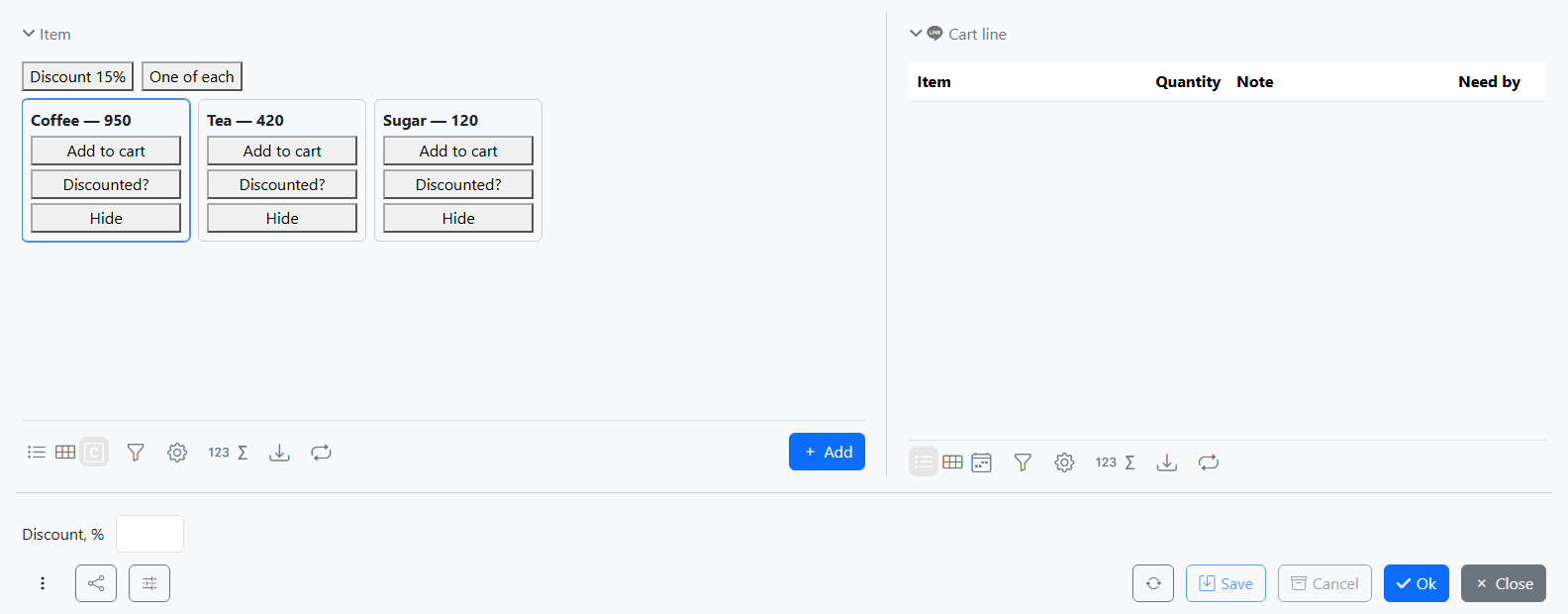
The opened form:
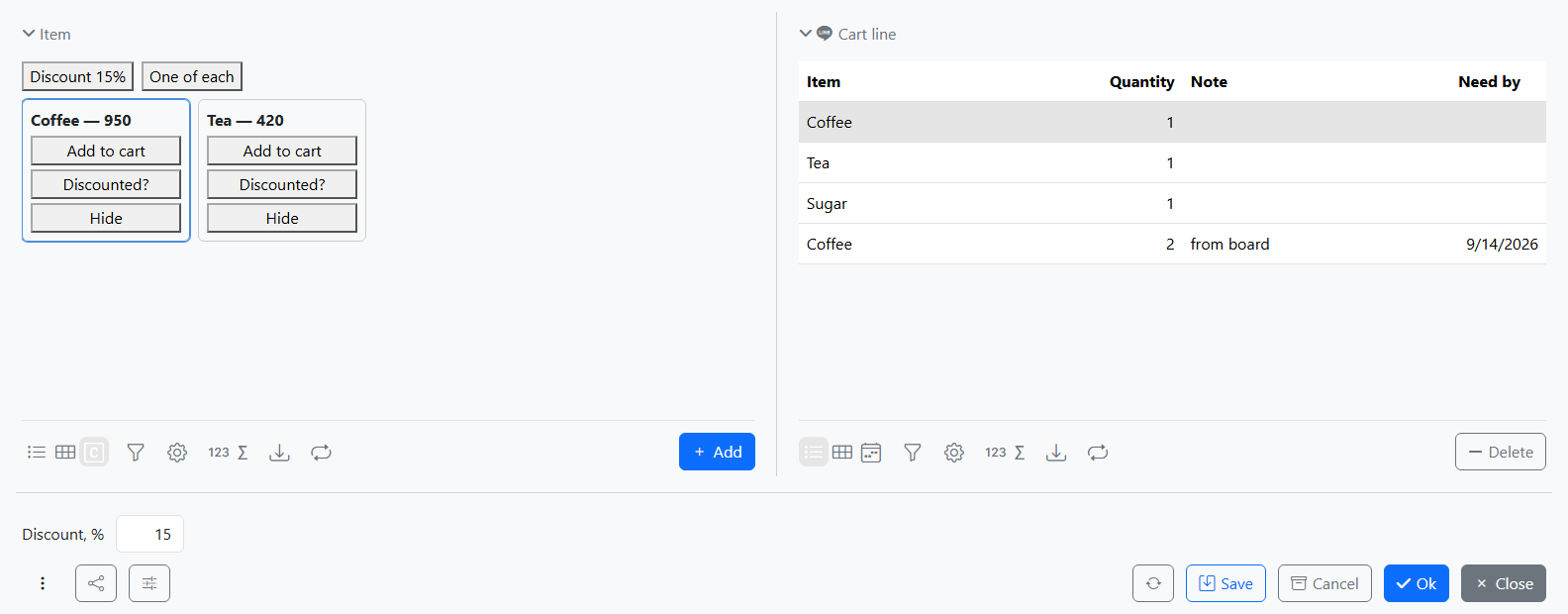
After "Discount 15%", "One of each", "Add to cart" on the coffee card, and "Hide" on the sugar card:
Parameters and the result
The calls pass parameters positionally as plain JS values: addToCart receives the object as its numeric id — the item.key of the card's row — and the INTEGER, STRING and DATE primitives directly (an actual Date for DATE). addSet receives a plain JS array for its JSON parameter. The preview promise resolves to the number produced by the action's RETURN.
Sessions
On the form the calls run in the form's session: the cart line and the "hidden" flag are visible immediately, but reach the database only when the form is saved. When a change affects the component's own list — hiding a card here — the platform calls its update, and the component rebuilds the DOM from scratch, so transient state kept in DOM nodes — the "≈ 807.5" text on the preview button — is wiped by the next such update. To display a result persistently, put it into a form property.
The gate
CUSTOMS opens the listed entries to the controller of this form only, and it does not restrict the argument values the component passes, so every listed entry must stay safe for an arbitrary id and arbitrary values. The edit double-click needs no entry: an action drawn on the form is executed through the form-edit channel (changeProperty), which is not gated — but which also takes no extra arguments, only the target row. As soon as an argument that is not on the form is needed — a quantity, a percentage, an array — that is exec plus an entry in CUSTOMS.