Backups
The platform creates database backups by calling the standard PostgreSQL utility pg_dump, and restores selected tables of a backup by calling pg_restore into a temporary database. Backup management is performed in the Administration > System > Scheduler > Backup menu (Fig. 1.). Selective restore is performed in the Administration > System > Scheduler > Data recovery menu.
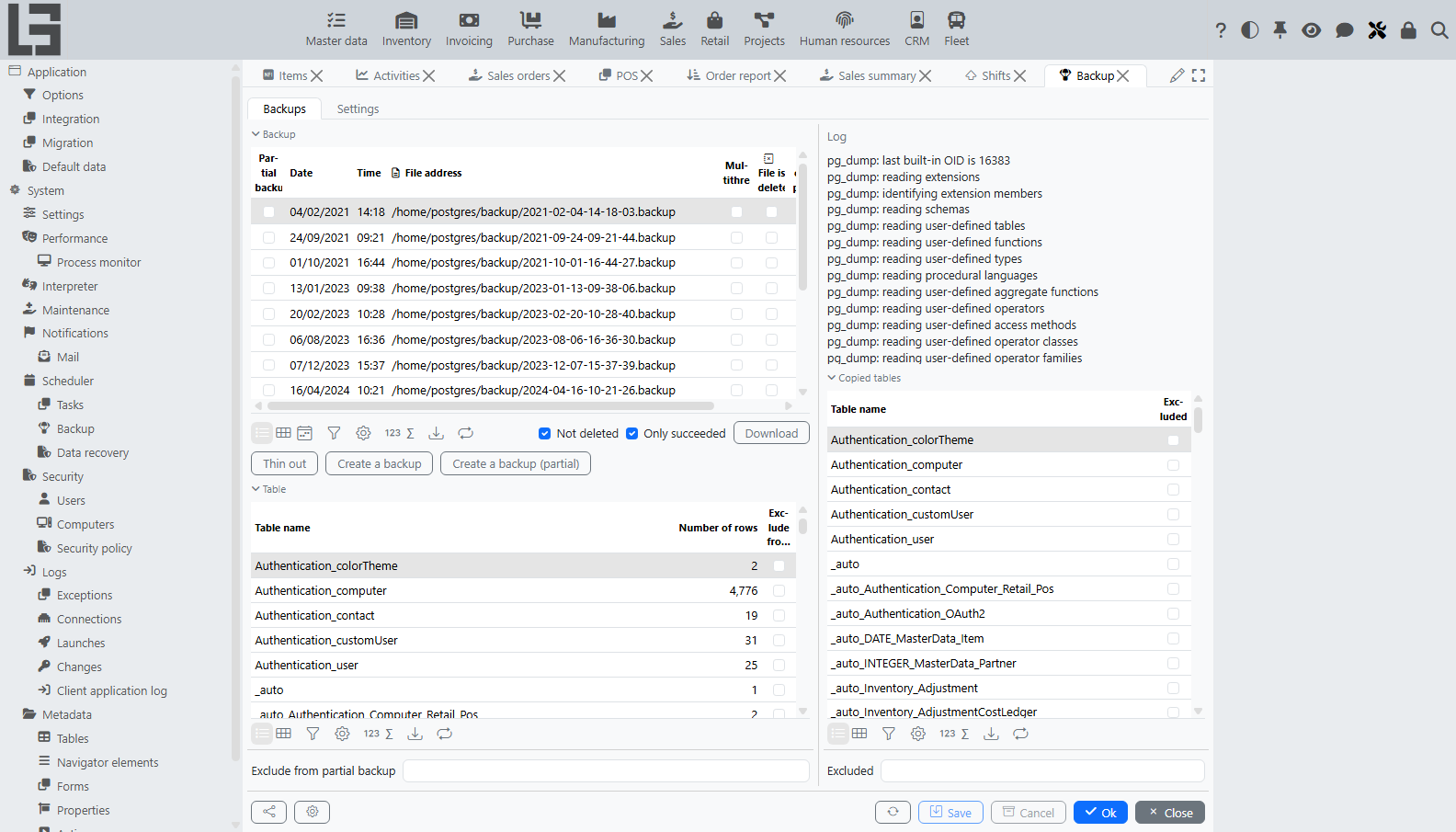
Fig. 1. List of created backups
Settings
Backup parameters are configured on the Settings tab of the Backup form (Fig. 2.).
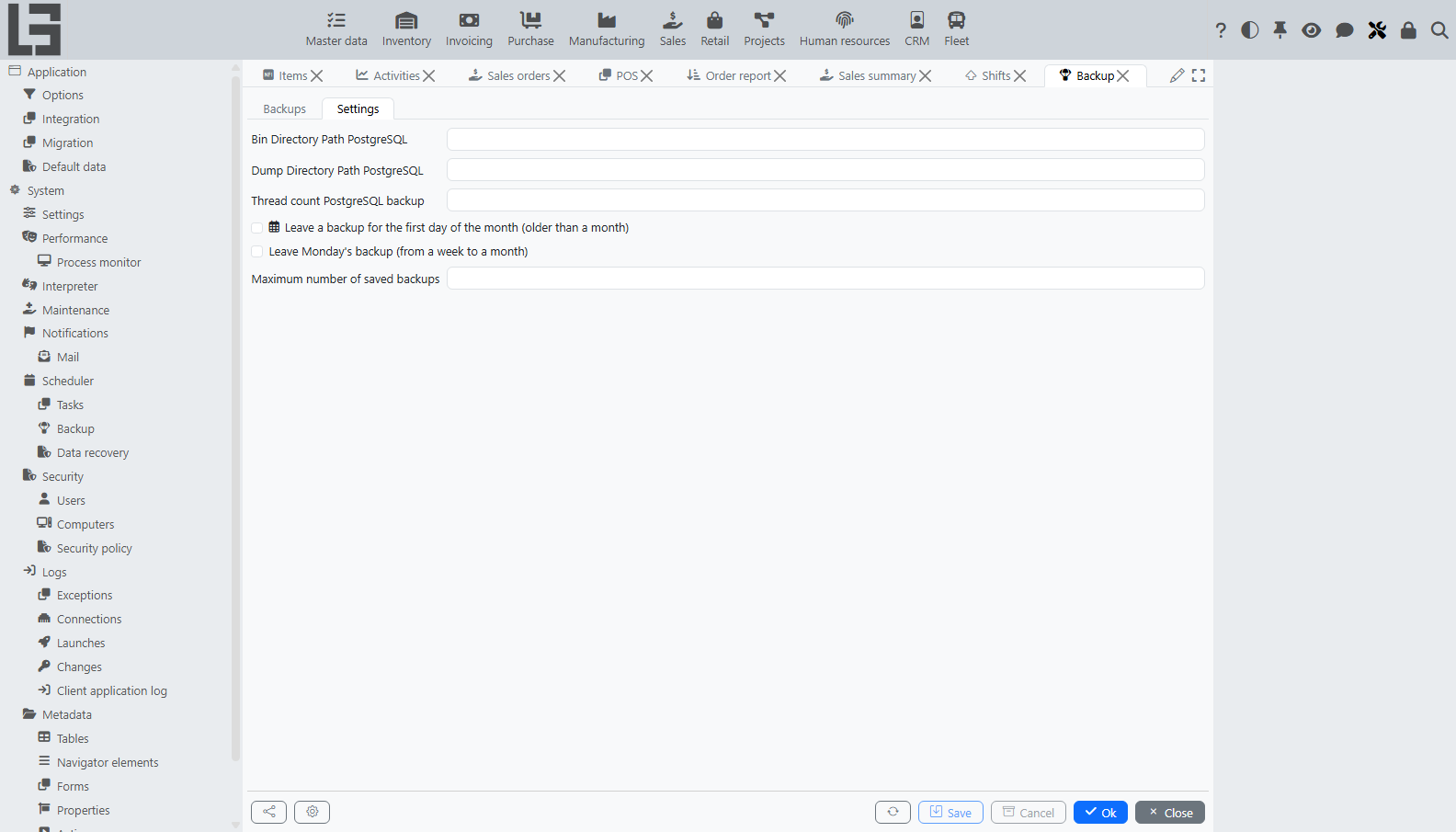
Fig. 2. Backup settings
Bin Directory Path PostgreSQL– path to the PostgreSQLbindirectory containingpg_dump,pg_restore,createdb, anddropdb. If the field is empty, the platform calls these utilities by name from the systemPATH.Dump Directory Path PostgreSQL– directory where backup files are written. If the directory does not exist, the platform tries to create it. If neither is possible, the backup is canceled with an error message.Thread count PostgreSQL backup– number of parallelpg_dumpjobs. With a value greater than 1 the backup is created in PostgreSQLdirectoryformat (a folder containing several files), and otherwise it is created as a single file in thecustomformat. The default value is 1.Leave Monday's backup (from a week to a month)– when set, a backup made on a Monday is kept until it becomes older than a month, even if it would otherwise be deleted by the retention rules.Leave a backup for the first day of the month (older than a month)– when set, a backup made on the first day of a month is kept regardless of its age.Maximum number of saved backups– upper limit on the number of backups kept after thinning. If this field and both of the previous flags are empty, the limit defaults to 30.
Creating a backup
A backup can be created manually from the toolbar of the Backups tab or automatically by the scheduler.
The toolbar contains three buttons:
Create a backup– creates a full backup of all platform tables.Create a backup (partial)– creates a backup that excludes the tables marked for exclusion (see below).Thin out– immediately applies the retention rules (see Retention).
The platform ships with a default scheduled task Backup that runs daily at 01:00 and executes Backup.makeBackup[] followed by Backup.decimateBackups[]. The task is not created automatically on startup: it is registered when default data is loaded for the application (the Load default data button on the Administration > Application > Default data form). The schedule and the list of actions can be edited like any other task — see Scheduler.
Each created backup is stored as a row on the Backups tab with the following columns:
Partial backup– set if the backup was created withCreate a backup (partial).Date,Time– the moment the backup was started. The file name inDump Directory Path PostgreSQLhas the formyyyy-MM-dd-HH-mm-ss.backup.File address– full path to the backup file (or directory, for multithread backups).Multithread– set if the backup was created with several threads, that is, indirectoryformat.File is deleted– set after the backup file has been removed byDeleteor by thinning.Not completed– set ifpg_dumpexited with a non-empty log and no successful completion record.Log– the full text of thepg_dumplog written to the file with the.logsuffix next to the backup file.
By default the list is filtered by Not deleted and Only succeeded. Both filters can be turned off to see all rows.
The Download button on the row of a backup downloads the backup file to the client. A backup stored in directory format is packed into a single ZIP archive before downloading. The Delete button removes the backup file (or directory) and the corresponding log file from Dump Directory Path PostgreSQL and marks the row as File is deleted. The row itself stays in the list for reference.
Partial backups
A partial backup omits the data of selected tables. The table structure and the data of all other tables are saved as usual. Tables are excluded in two ways (Fig. 3.):
- by setting the
Exclude from partial backupflag on a row of the table list shown on the same tab. This setting is persistent and is applied every timeCreate a backup (partial)is pressed; - by listing the table names, separated by commas, in the
Excludedfield below the table list. This is convenient for tables that are not yet present in the table list at configuration time.
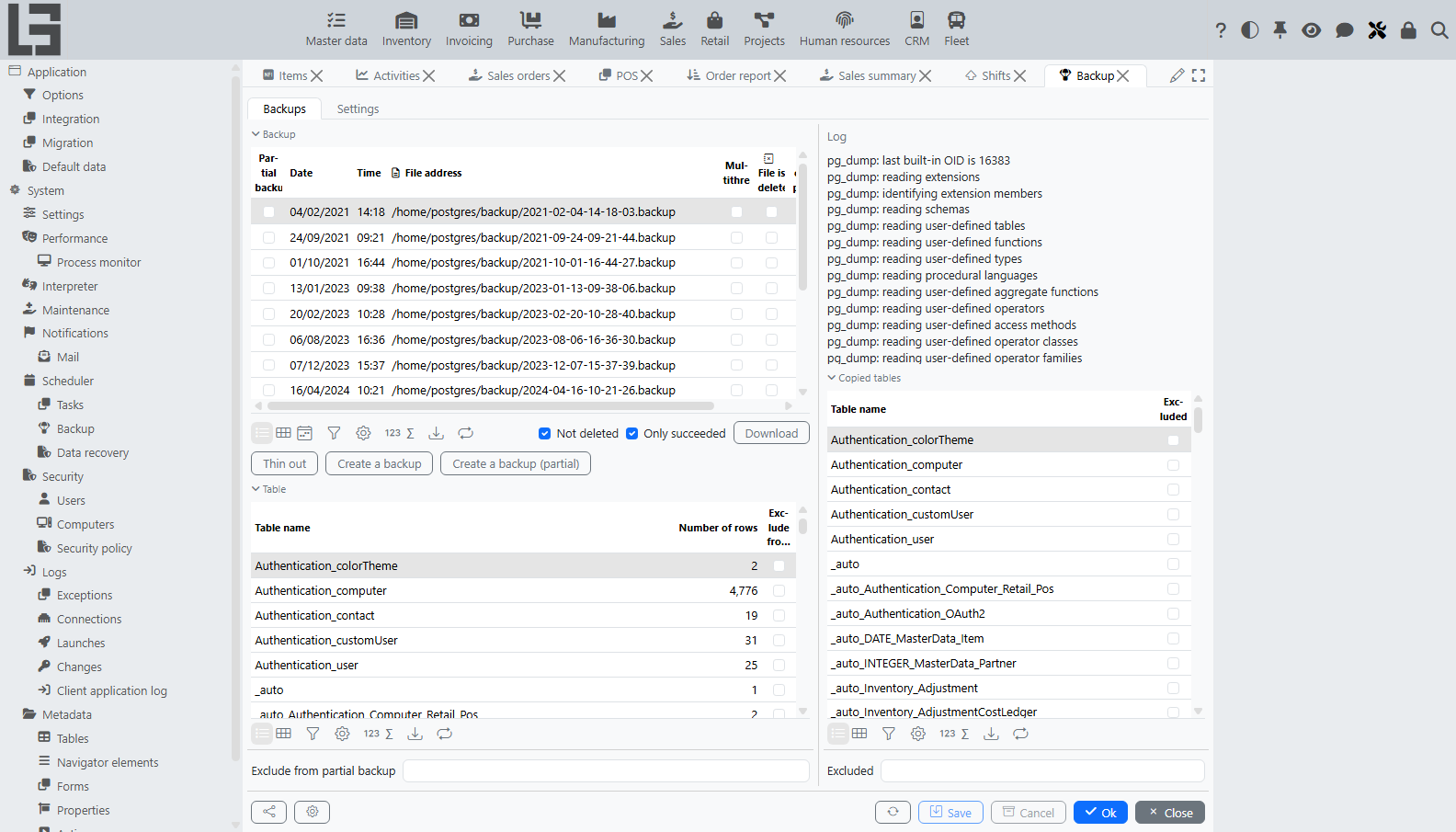
Fig. 3. Configuring tables to exclude from a partial backup
For a backup already in the list, the actual set of excluded tables is visible in the right panel: the Copied tables block shows each table with the Excluded flag for this particular backup, and the Excluded field below it shows the per-backup free-form list. The corresponding pg_dump call is made with --exclude-table-data=<table> for every excluded table.
Retention
The Thin out action (also invoked daily by the default scheduled task) deletes backup files that are no longer needed and marks the corresponding rows as File is deleted. Backups already marked as deleted are ignored. The rules are evaluated against the date of each backup, from newest to oldest:
- a backup made within the last 7 days is kept;
- a backup between 8 and 30 days old is kept only if it was made on a Monday and
Leave Monday's backupis set, or on the first day of a month andLeave a backup for the first day of the monthis set; - a backup older than 30 days is kept only if it was made on the first day of a month and
Leave a backup for the first day of the monthis set; - once the number of kept backups reaches
Maximum number of saved backups, all older ones are deleted regardless of the other rules.
If Maximum number of saved backups, Leave Monday's backup, and Leave a backup for the first day of the month are all empty, the platform uses a default Maximum number of saved backups of 30.
Restoring data
The platform supports two kinds of restore:
- a full restore over the working database, performed manually with PostgreSQL utilities outside the user interface;
- a selective restore of chosen tables and columns from a backup into the running database, performed from the
Data recoveryform.
Full restore
A full restore replaces the entire working database with the contents of a backup file. The platform does not perform this operation from the user interface because it requires the server to be stopped — there is no safe way to drop and recreate the working schema while application sessions are running and modifying it. A full restore is performed manually by an administrator (Fig. 5.):
- Stop the platform server.
- Drop the working database with
dropdb <dbname>. - Create an empty database with the same name with
createdb <dbname>. - Run
pg_restore --dbname=<dbname> <backup_file>against the empty database. Thepg_restore,dropdb, andcreatedbutilities are taken fromBin Directory Path PostgreSQL(see Settings) or from the systemPATH. - Start the platform server. On startup the platform synchronizes the database structure with the current set of
.lsfmodules, migrating any tables that are missing or have changed since the backup was created.
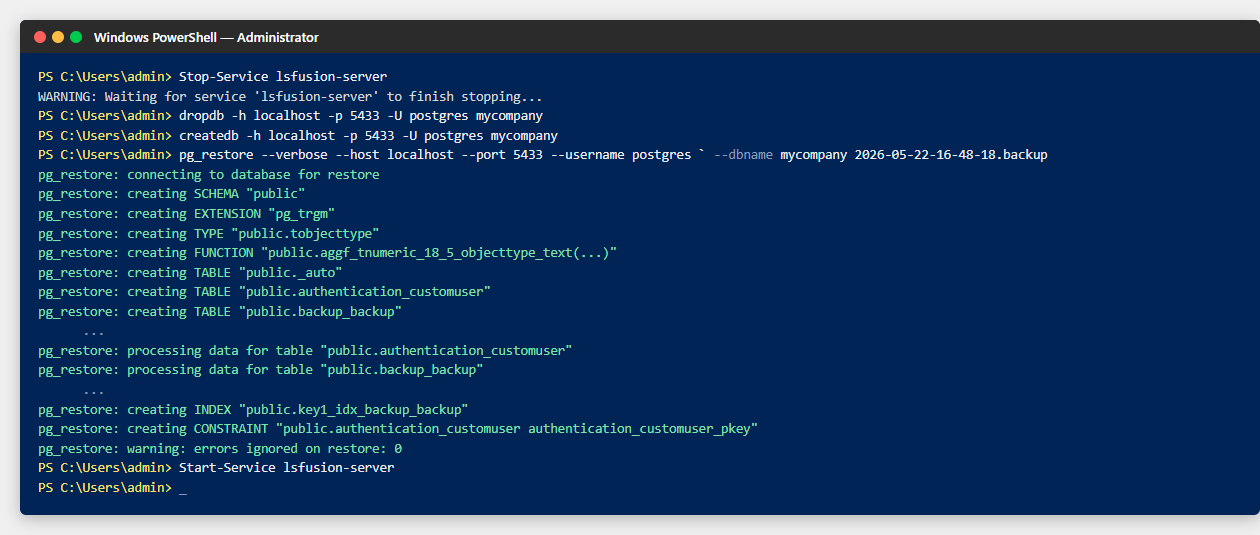
Fig. 5. Full restore command sequence
A backup created in directory format (with Thread count PostgreSQL backup greater than 1) must be restored with pg_restore --format=d <backup_dir>. For the custom single-file format pg_restore auto-detects the format from the file header.
Selective restore
The selective restore form is opened from Administration > System > Scheduler > Data recovery (Fig. 4.).
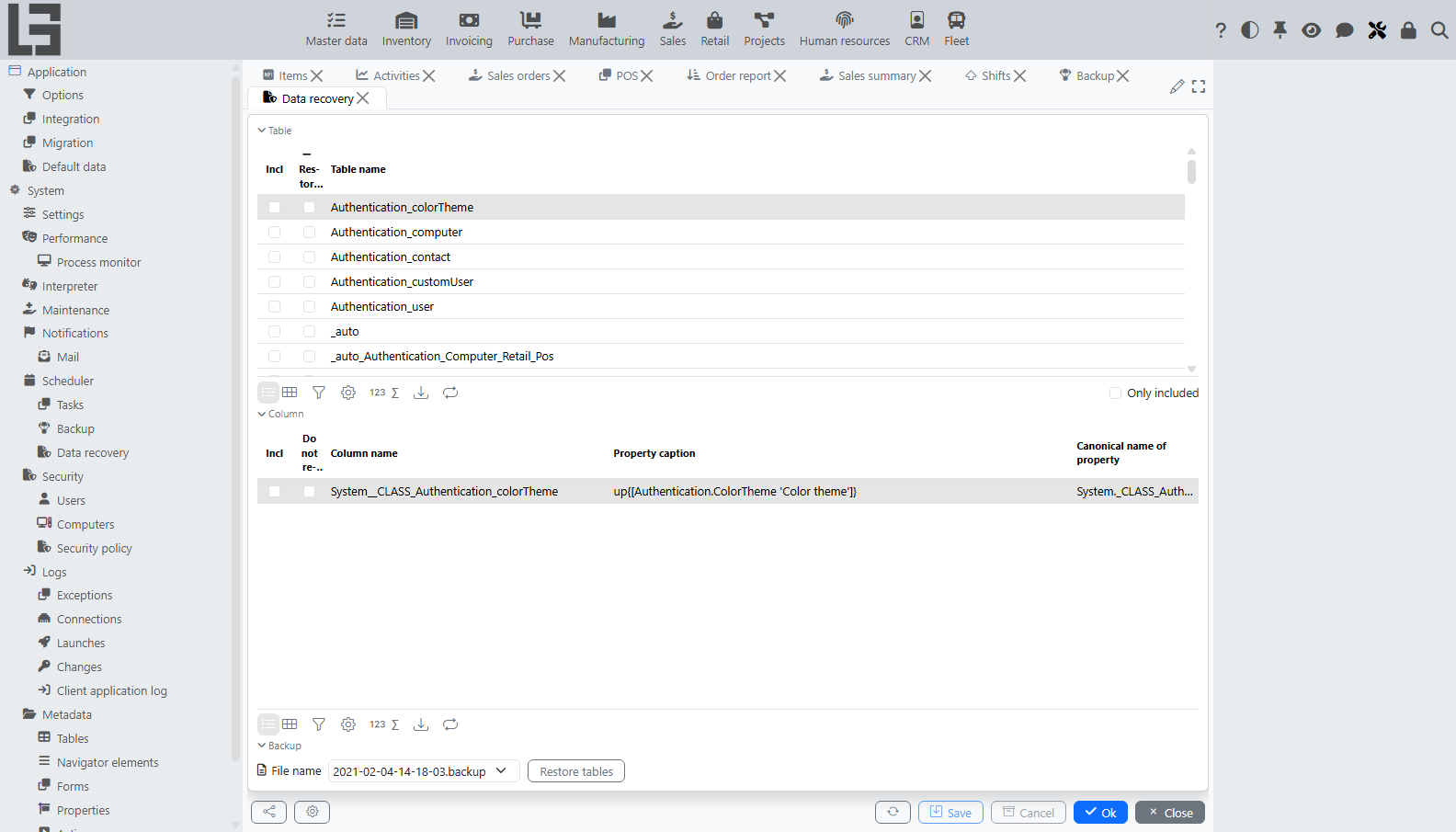
Fig. 4. Selecting tables and columns to restore
The form contains three parts:
- a list of tables on the left, with an
Inclflag for each table to include in the restore and aRestore deleted objectsflag (see below); - a list of columns of the selected table on the right, with an
Inclflag for each column to import and aDo not replaceflag (see below); - a backup selector and the
Restore tablesbutton at the bottom.
The restore is executed as follows. The platform calls createdb to create a temporary database whose name starts with db-temp and then calls pg_restore --table <name> for each included table into that database. The data of the included columns is read from the temporary database and written into the working database in a regular user session, so all constraints, events, and aggregations defined for the affected properties are applied as usual. The temporary database is dropped after the restore completes, regardless of whether it succeeded.
The two per-row flags control how the data is written:
Restore deleted objects– when set, rows whose object identifier is no longer present in the working database are restored by creating an object with the original identifier. When not set, such rows are skipped.Do not replace– when set on a column, the value from the backup is written only for those objects where the column is currently empty. Existing values are left as they are.
If the backup file does not exist or no tables are marked with Incl, the restore is canceled with an error message.
The selective restore reads tables from the backup by their physical names. Tables that have been renamed, deleted, or split since the backup was created may be unreadable. In this case the corresponding line in the pg_restore log will indicate the missing table, and no data will be imported for it.